


VocAlign 7: Syncing Vocals Has Never Been Easier
For three decades, Synchro Arts VocAlign has been one of the go-to tools for producers and engineers who need to make vocal performances sit together more tightly. Now, with VocAlign 7, the company is taking a much bigger step than a routine version update.
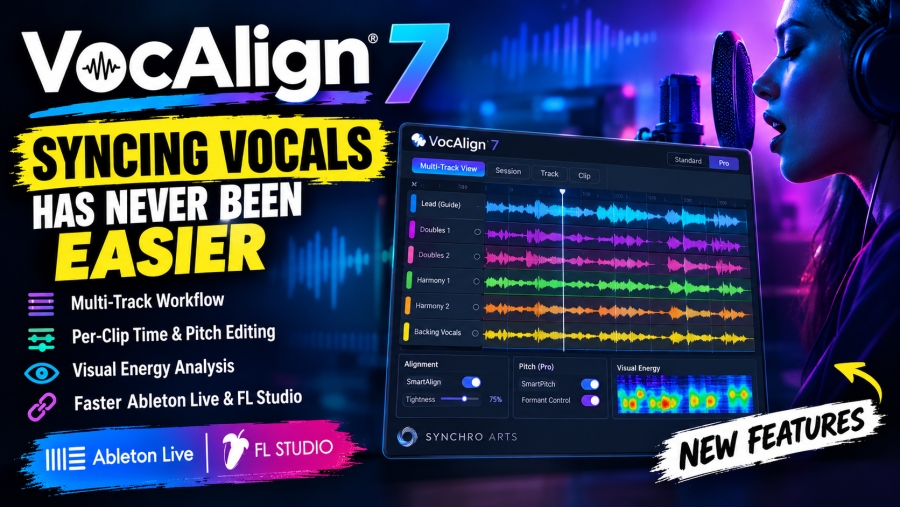
Released in September 2026, VocAlign 7 has been rebuilt around a new multi-track workflow, allowing producers to bring leads, doubles, harmonies and backing vocals into one workspace. The update also introduces session-, track- and clip-level timing and pitch control, visual energy analysis, creative formant processing in Pro, and a significantly streamlined workflow for users of non-ARA DAWs such as Ableton Live and FL Studio.
The result is a version of VocAlign designed less around processing one vocal at a time and more around managing an entire vocal production.
Here’s everything you need to know about VocAlign 7, including its new multi-track workflow, pitch and timing tools, Ableton Live and FL Studio improvements, Standard vs Pro editions, compatibility and what the upgrade means for modern vocal production.
What Is VocAlign 7?
VocAlign 7 is a professional vocal alignment plugin from Synchro Arts, designed to synchronize the timing and, in the Pro edition, pitch and tonal characteristics of multiple vocal performances.
The basic idea behind VocAlign has always been straightforward: choose a Guide performance and align one or more Dub performances against it.
That can be extremely useful when working with vocal doubles, harmonies, backing vocals, chorus stacks and other layered performances.
VocAlign has been around since 1995, giving the technology a 30-year history in music, film and television production. Synchro Arts says the software has been used to help align vocals and dialogue across professional productions, making version 7 a particularly significant milestone for the company.
What makes VocAlign 7 different is that the software is no longer primarily organized around individual vocal tracks.
Instead, the entire vocal stack becomes the workspace.
The Biggest VocAlign 7 Upgrade: Multi-Track View
The headline feature in VocAlign 7 is the new Multi-Track View.
Instead of opening and managing separate VocAlign instances for different vocal performances, users can capture multiple vocals in a single workspace, assign guides and dubs and align an entire stack in one operation.
That is a major workflow change for anyone working with modern vocal productions.
A typical pop or electronic vocal session might contain a lead, two or three doubles, several harmony parts, octave vocals, chorus stacks, ad-libs and additional backing vocals.
Previously, managing those performances could involve repeatedly moving between tracks, assigning guide and dub relationships and processing individual instances.
VocAlign 7 puts those performances together.
The company describes the workflow as allowing flexible guide and dub assignment, meaning producers can decide which performance should act as the reference and which tracks should follow it.
This is particularly useful because not every vocal in a stack should necessarily follow the same reference.
Align an Entire Vocal Stack in One Operation
Imagine a chorus containing a lead vocal, two doubles and six backing vocal tracks.
With a traditional editing workflow, you might manually edit every performance against the lead. That could mean cutting regions, moving consonants, checking syllables and repeatedly switching between tracks.
VocAlign 7 is designed to automate much of that repetitive process.
You can bring the vocal performances into the Multi-Track View, assign the appropriate guide and align the stack together. The software can then be used for broad corrections before individual tracks or clips are refined.
Synchro Arts and third-party product listings describe this as session-, track- and clip-level processing, meaning you can make a broad adjustment and then move down to a specific vocal or individual clip without having to restart the entire alignment process.
That “go broad, then get precise” approach could be one of the most useful aspects of the update.
Session, Track and Clip-Level Editing
One of the biggest complaints with highly automated vocal editing is that global processing can sometimes be too aggressive.
A vocal stack may need to be tightened overall, but one particular phrase might already be working perfectly.
VocAlign 7 addresses that with more granular editing control.
Users can make corrections across an entire session, target a particular track or make a more surgical adjustment to an individual clip. In Pro, these controls extend to both pitch and timing.
That gives engineers a workflow that can look something like this:
- Align the overall vocal stack.
- Listen for areas that still feel loose.
- Identify the specific track causing the problem.
- Refine the individual phrase or clip.
- Leave the rest of the performance untouched.
This is an important distinction because good vocal production isn't necessarily about making every syllable perfectly identical.
It is about deciding where precision improves the record and where natural variation should remain.
Visual Energy Analysis Makes Problems Easier to Find
Another new feature is Visual Energy Analysis.
VocAlign 7 uses visual information to help show where performances differ in energy and alignment, making it easier to identify sections that require attention.
This can be particularly helpful in dense vocal arrangements.
When eight or ten vocal tracks are playing simultaneously, identifying the source of a timing problem by ear can take time. A visual representation gives the engineer another way to locate sections where performances aren't behaving consistently.
The goal isn't to replace listening.
Instead, visual analysis can make the process of finding the problem faster, after which the engineer can make the musical decision about how much correction is appropriate.
For large vocal sessions, that combination of visual information and automated alignment could significantly reduce the amount of time spent searching through waveforms.
SmartAlign and Tightness Control Return
VocAlign 7 retains two of the key workflow concepts that have become associated with the modern VocAlign experience: SmartAlign and Tightness Control.
SmartAlign is designed to understand where alignment should begin and end across vocal material, reducing the need to manually define every region that should be processed.
Tightness Control is arguably just as important.
Not every vocal needs to be locked tightly to the guide.
A professional double might benefit from relatively precise consonant alignment, while a background harmony could sound more natural with a little rhythmic movement left intact.
Tightness Control gives the engineer a way to choose between a more precise result and a looser, more natural performance.
This is important because perfect synchronization isn't always the goal.
The best vocal stacks often retain subtle differences between performances.
VocAlign 7 Pro Adds Pitch Matching
VocAlign 7 comes in Standard and Pro versions, with Pro adding more advanced pitch-processing features.
Standard focuses primarily on vocal timing alignment.
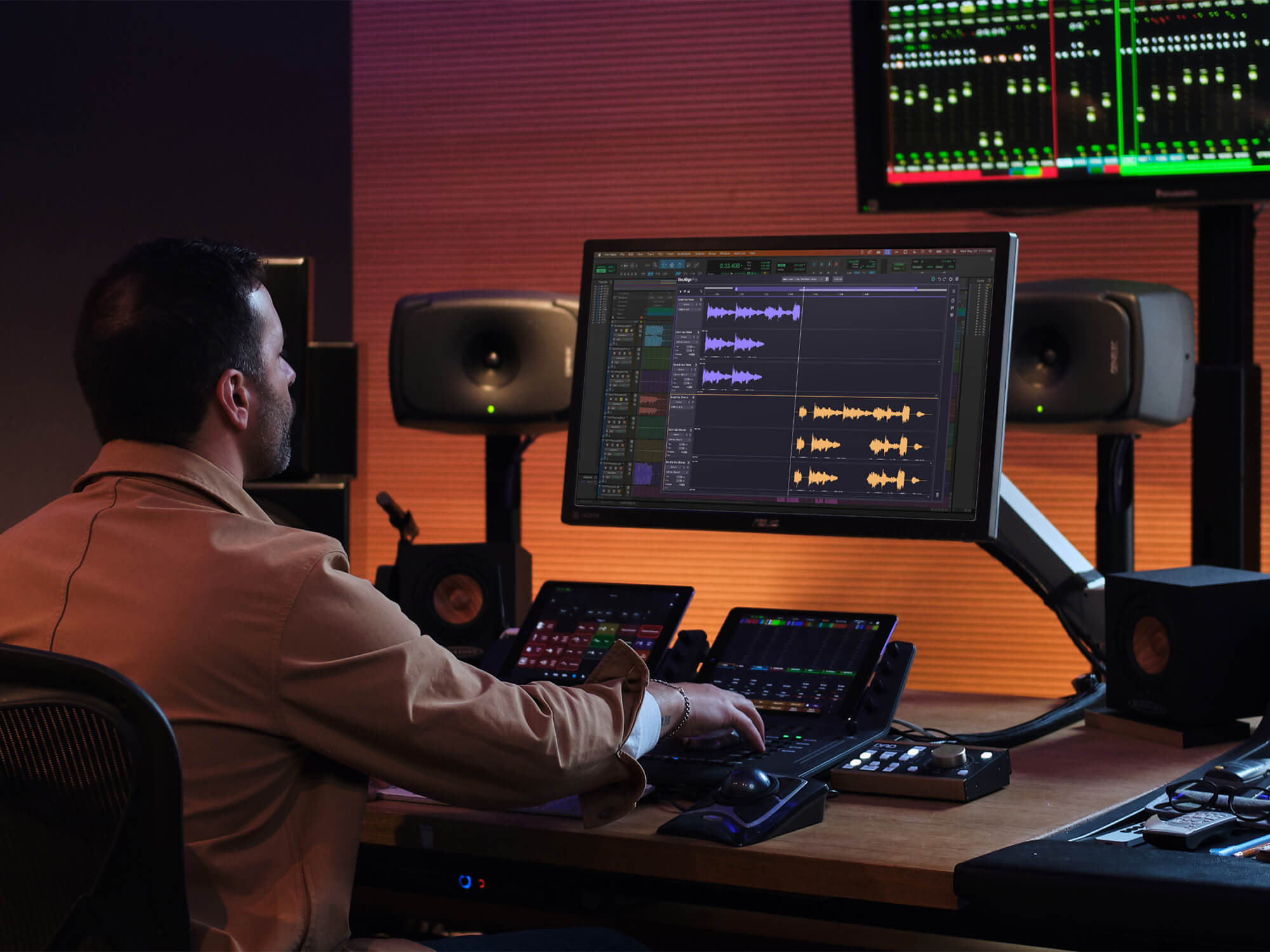
VocAlign 7 Pro adds pitch matching and SmartPitch, allowing producers to apply the pitch characteristics of a guide to other vocal performances while intelligently handling harmony parts.
That can save a significant amount of work when a producer has already tuned the lead vocal.
Instead of separately pitch-correcting every double or backing vocal, SmartPitch can be used to handle pitch relationships within the stack.
Crucially, the system isn't simply about forcing every vocal onto the exact same notes.
VocAlign's SmartPitch workflow is designed to recognize unison and harmony relationships, allowing producers to match unison parts while treating harmony performances differently.
That makes the feature especially interesting for layered vocal production.
Creative Formant Control for Better Doubles
VocAlign 7 Pro also introduces Creative Formant Control, which allows formants to be shifted independently.
Formant processing can be useful when creating vocal doubles because two performances can otherwise remain too similar even after timing alignment.
Subtle formant changes can help separate layers and create a wider, more natural vocal stack without relying entirely on EQ or stereo processing. Synchro Arts positions the feature as a way to create more natural doubles, additional width and greater separation between vocal layers.
For producers building large pop, R&B, hip-hop or electronic vocal stacks, this could become an important part of the finishing process.
The Ableton Live and FL Studio Workflow Finally Gets Easier
One of the most interesting VocAlign 7 improvements is aimed at producers using non-ARA DAWs.
ARA integration allows compatible DAWs to communicate more directly with audio-editing plugins, making workflows such as vocal alignment much faster.
But popular DAWs including Ableton Live and FL Studio have historically required a different workflow.
Previous versions involved additional capture steps and, depending on the setup, sidechain routing. Synchro Arts' own Ableton documentation for VocAlign 6 demonstrates the older approach, where users had to configure sidechain inputs and capture audio in real time.
VocAlign 7 changes that workflow.
The company says the new non-ARA workflow removes the old sidechain capture process and eliminates the need for Ableton Live and FL Studio users to play through the entire session before alignment can begin.
For producers working primarily in Ableton Live or FL Studio, this could arguably be one of the most important upgrades in the entire release.
It makes VocAlign much less dependent on workarounds that were necessary when working outside ARA-compatible environments.
SynchroLink 2.0 Connects VocAlign 7 With RePitch 2
VocAlign 7 Pro also introduces SynchroLink 2.0, designed to connect VocAlign with RePitch 2 Standard.
The idea is simple: vocal tuning and vocal alignment don't need to exist as completely separate processes.
With SynchroLink 2.0, edits made in RePitch can be transferred into VocAlign so that pitch and timing processing remain connected. Synchro Arts says the two products can effectively operate as part of a unified vocal-production process.
For engineers who already use RePitch, that integration could make complex vocal editing considerably more streamlined.
It also demonstrates where Synchro Arts appears to be taking its software ecosystem: rather than treating tuning, timing, formant processing and alignment as isolated tasks, the company is connecting them into a broader vocal-production workflow.
VocAlign 7 Standard vs Pro
The two versions serve different types of users.
VocAlign 7 Standard provides the core multi-track vocal alignment workflow, including timing alignment, Multi-Track View, SmartAlign, Tightness Control and Visual Energy Analysis.
VocAlign 7 Pro adds pitch matching, SmartPitch, Creative Formant Control, Sync Points, Protected Areas, Transpose and SynchroLink 2.0.
The choice therefore comes down largely to how deep your vocal-editing workflow needs to go.
If you're primarily trying to tighten doubles and backing vocals, Standard may provide the tools you need.
If you regularly tune harmonies, manipulate formants, make detailed pitch-and-timing corrections and want RePitch integration, Pro provides the more comprehensive workflow.
Pricing, Upgrades and System Requirements
Synchro Arts currently lists VocAlign 7 Standard at $149 and VocAlign Pro at $199 on its product ecosystem, while eligible existing owners can access upgrade pricing. The company says upgrades start at $69 for Standard and $99 for Pro, depending on the previous license.
VocAlign 7 supports macOS 12 or later on Intel and Apple Silicon systems, with AU, VST3 and AAX 64-bit hosts. On Windows, it requires Windows 10 or later and supports VST3 and AAX 64-bit hosts.
Synchro Arts also offers a fully functional three-day trial through its account system. The company notes that the trial automatically converts to a paid subscription unless cancelled before the trial ends.
Is VocAlign 7 Worth the Upgrade?
For producers who regularly work with vocal stacks, the answer largely depends on how much time is currently spent managing individual vocal tracks.
The biggest reason to consider VocAlign 7 isn't necessarily a completely different alignment algorithm.
It is the workflow.
Being able to see multiple vocals together, assign guides and dubs, align the entire stack, inspect visual energy differences and then make track- or clip-level adjustments addresses a much broader production problem than simply tightening one vocal.
The new non-ARA workflow could also make the upgrade particularly relevant for Ableton Live and FL Studio users.
For existing VocAlign users who mainly work on single vocal tracks, the benefits may be less dramatic.
But for anyone editing large vocal arrangements, moving from session-wide corrections to individual clip-level fixes without starting over could save substantial time.
Final Thoughts
VocAlign 7 represents one of the biggest workflow changes in the history of Synchro Arts' vocal-alignment technology.
After 30 years of development, the company has moved the focus from aligning individual performances to managing complete vocal stacks. The new Multi-Track View, session-, track- and clip-level control, Visual Energy Analysis and improved non-ARA workflow all target the same problem: reducing repetitive editing while giving producers more control over the final result.
For Ableton Live and FL Studio users, the streamlined non-ARA workflow may be especially significant, removing much of the previous capture overhead.
For Pro users, SmartPitch, Creative Formant Control, Sync Points, Protected Areas and SynchroLink 2.0 push VocAlign further into a complete vocal-production environment.
Most importantly, VocAlign 7 doesn't have to mean making every vocal perfectly identical.
The best use of the technology is to establish a coherent foundation, then preserve the small differences that make layered performances sound human.
That combination — automation for speed, detailed control for precision and musical judgment for the final result — is what makes VocAlign 7 such an interesting update for modern vocal production.
