


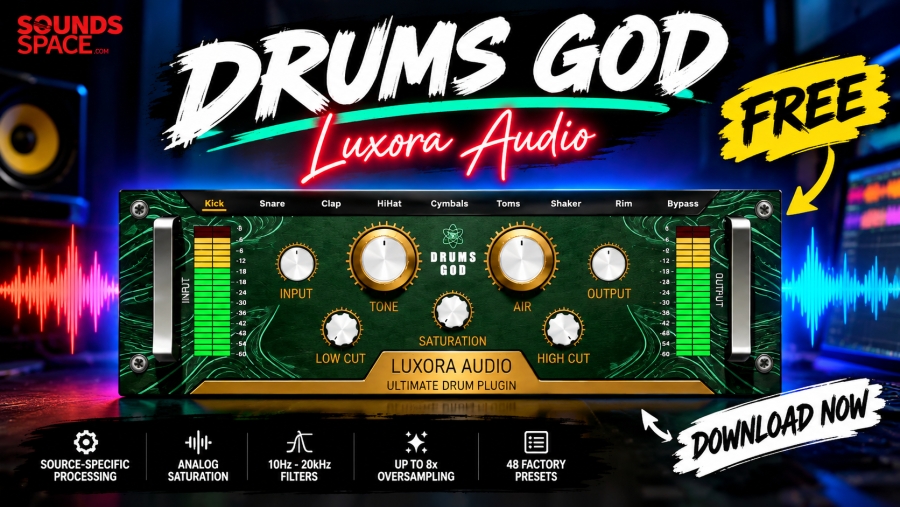
Drums God by Luxora Audio Is Now Free on Sounds Space: Download This Drum Processing Plugin
If your drum mixes need more punch, clarity, warmth and control, there is a new free plugin worth putting on your radar.
Drums God by Luxora Audio is now available through Sounds Space as a completely free-for-life drum processing plugin, giving producers and mixing engineers another tool for shaping kicks, snares, toms, hi-hats, overheads, rooms and other percussion elements without adding another paid plugin to the budget.
The Sounds Space listing currently shows the plugin at $0.00, with no credit card required and no expiration date.
You can download Drums God for free here: Drums God – Free Download on Sounds Space
Developed by Luxora Audio, Drums God is designed around a straightforward idea: instead of building complicated chains of EQ, saturation, and other processing tools for every drum sound, producers can load one plugin and select the type of drum they are working with.
Here's what you need to know about this new free drum mixing plugin.
What Is Drums God by Luxora Audio?
Drums God is a drum processing plugin designed for modern music production, with a workflow focused on quickly improving the character and balance of individual drum tracks and drum buses.
Luxora Audio describes the plugin as combining precision frequency control, analog-style saturation and source-specific processing. The goal is to give producers an efficient way of getting more punch, definition and character from drums without creating long processing chains.
The plugin is available for macOS and Windows, supporting VST3 and AAX on Windows and VST3, AU and AAX on macOS. It requires macOS 11 Big Sur or later or Windows 10 or later, with 4GB of RAM listed as the minimum requirement.
Perhaps the biggest attraction, however, is the price.
Drums God is free for life.
According to the current Sounds Space listing, there is no expiration date and no credit card requirement.
Download Drums God for Free
If you're ready to try the plugin, you can get it directly from the Sounds Space product page:
Download Drums God for FREE on Sounds Space
The Sounds Space listing currently shows $0.00 and identifies the product as a digital download delivered by email.
For producers who regularly search for free VST plugins, free drum plugins and no-cost mixing tools, this makes Drums God an easy plugin to investigate.
Source-Specific Drum Processing
One of the most interesting features of Drums God is its source-specific processing workflow.
Rather than treating every drum the same way, the plugin provides different processing modes designed around individual drum sources.
The current Luxora Audio page lists dedicated modes for Kick, Snare, Toms, Hi-Hats, Overheads and Room.
The Sounds Space listing describes an expanded selection that also includes Clap, Cymbals, Shaker and Rim, alongside the core drum categories.
This approach is particularly useful for producers who don't want to spend several minutes deciding which EQ curve or saturation setting to start with.
Instead, the workflow is simple: load Drums God, choose the source you're processing and adjust the available controls to taste.
That doesn't eliminate the need for critical listening, but it can make the starting point considerably faster.
Kick and Snare Processing
Kick and snare sounds are often the foundation of modern drum mixes, and Drums God is specifically designed to address both.
The Sounds Space description says its Kick and Snare processing is intended to provide tighter low-end, snapping transients and impactful drum sounds.
For a kick, that kind of workflow can be useful when the drum needs more definition in a dense mix.
For snares, processing can help emphasize the attack and body without requiring a complicated chain of separate processors.
Of course, the correct amount of processing depends on the recording or sample, arrangement and genre. A trap kick, rock snare and acoustic jazz drum will not necessarily need the same treatment.
The advantage of Drums God is that it gives you a dedicated starting point rather than forcing you to build the chain from scratch.
Low Cut and High Cut Filters
Drums often contain frequencies that aren't contributing much useful information.
A kick may have unnecessary subsonic energy. A hi-hat may contain excessive low-frequency spill. Overheads can accumulate unwanted low-end information from the rest of the kit.
Drums God includes dedicated Low Cut and High Cut filters covering 10 Hz to 20 kHz, allowing users to clean up the frequency range of the processed drum signal.
That broad range means the filters can be used for both subtle cleanup and more obvious tonal shaping.
The important thing is not to assume that cutting more frequencies automatically makes a drum sound better.
Use the filters while listening in context with the rest of the mix.
Air Control for Fast Tonal Shaping
Another major feature is Drums God's Air Control.
The control applies a spectral tilt of up to ±12 dB, allowing producers to push a drum sound toward a brighter or warmer tonal balance.
This can be useful when you need a quick adjustment without manually drawing an EQ curve.
For example, an overhead track that feels slightly dull may benefit from a gentle lift, while a cymbal-heavy drum bus that feels too aggressive may need a warmer balance.
The ±12 dB range provides plenty of room for experimentation, but that doesn't mean you should automatically use extreme settings.
A small adjustment can often be enough.
Analog Saturation and Transformer Modeling
Drums God isn't only an EQ-style processor.
Luxora Audio says the plugin uses analog circuit and transformer modeling inspired by Class-A analog preamps to introduce harmonic content, warmth, density and punch.
This is an important part of the plugin because saturation can change how a drum feels without simply increasing its volume.
A clean digital drum sample can sometimes feel disconnected from the rest of a production. Adding controlled harmonic content can help it feel denser and more present.
The trick is restraint.
Heavy saturation can be a creative effect, but if you're trying to preserve the natural transient of a kick or snare, too much processing can work against you.
Drums God gives you the processing environment; your ears still determine how much is appropriate.
Up to 8x Oversampling
Drums God also includes selectable oversampling options.
The current Sounds Space listing identifies 2x, 4x and 8x oversampling modes.
Luxora Audio describes the settings in different workflow terms:
- 2x: lower CPU usage for everyday production
- 4x: recommended for more critical mixing
- 8x: maximum processing accuracy with reduced aliasing
Oversampling can be particularly relevant when using nonlinear processing such as saturation.
The trade-off is processing power.
For tracking or large projects, 2x may make sense. When you're printing a final mix or working on a critical drum bus, you can experiment with the higher settings.
48 Factory Presets
Another useful feature is the included preset library.
The current Sounds Space listing states that Drums God includes 48 factory-handcrafted presets.
For beginners, presets can provide a useful starting point for understanding what the processor is doing.
Instead of opening a blank plugin and wondering where to begin, you can load a preset, compare the processed and unprocessed signal and then adjust the controls.
More experienced producers can also use the presets as starting points before creating their own settings.
The most important thing is to treat presets as starting points rather than finished mixing decisions.
Drums God for Individual Tracks
One of the easiest ways to use Drums God is on individual drum channels.
Try it on:
- Kick
- Snare
- Toms
- Hi-hats
- Overheads
- Room microphones
- Claps
- Cymbals
- Shakers
- Rims
The exact available source modes depend on the current version/listing, but the central concept remains the same: choose the drum source and use the dedicated processing approach.
This can be particularly useful in electronic music, hip-hop, pop, trap and other styles where individual drum elements need to occupy very specific frequency and dynamic spaces.
Using Drums God on a Drum Bus
You don't necessarily have to limit Drums God to individual drum tracks.
It can also be experimented with on a drum bus, where multiple elements are processed together.
A drum bus can benefit from subtle tonal shaping and saturation because the processing affects the relationship between the individual elements.
For example, a gentle amount of saturation combined with a small tonal adjustment can make a collection of individually processed drums feel more cohesive.
But again, subtlety is important.
If the drum bus already has compression, clipping, saturation and limiting, adding another aggressive processor may make the mix sound smaller rather than bigger.
Why Free Drum Plugins Matter
The growing number of capable free audio plugins has changed the economics of music production.
Producers no longer need to spend hundreds or thousands of dollars simply to assemble a functional collection of mixing tools.
Drums God joins a large ecosystem of free effects that can help producers experiment with professional-style workflows without immediately committing to paid software.
That is particularly useful for beginners.
Someone building their first plugin collection can use a free processor like Drums God to learn about frequency shaping, saturation, oversampling and source-specific processing before investing in more expensive tools.
It also makes sense for experienced producers who simply want additional colors in their toolkit.
System Requirements and Plugin Formats
Drums God supports modern Windows and macOS systems.
According to Luxora Audio, macOS users need macOS 11 Big Sur or later, with support for Intel and Apple Silicon processors. Supported formats are VST3, AU and AAX.
Windows users need Windows 10 or later on a 64-bit Intel or AMD x64 processor, with VST3 and AAX formats supported.
The stated minimum RAM requirement is 4GB.
As always, check your DAW's supported plugin formats before installation.
Is Drums God Worth Downloading?
At $0, Drums God is an easy plugin to explore if you produce music regularly and want another drum-processing option.
The interesting part isn't simply that it is free.
It's that the plugin combines several useful functions—source-specific processing, filtering, spectral tilt, analog-style saturation and oversampling—inside one interface.
That can potentially save time compared with building a processing chain from multiple plugins.
It also provides an approachable workflow for producers who don't want to spend a long time designing a drum chain from scratch.
Whether you ultimately use it on every drum mix is a matter of taste, but there is little financial risk in adding a free-for-life plugin to your toolkit.
How to Download Drums God for Free
Getting the plugin is straightforward.
Head to the official Sounds Space Drums God product page, where the current listing shows the plugin at $0.00.
Get Drums God Free on Sounds Space
You can also find information about the plugin directly from Luxora Audio:
Drums God – Official Luxora Audio Page
After installation, load it in your DAW, select the appropriate drum source and start comparing the processed signal with the original.
Final Thoughts
Drums God by Luxora Audio is an interesting new addition to the world of free drum plugins.
The combination of source-specific processing, 10 Hz–20 kHz filtering, ±12 dB Air Control, analog-style saturation, oversampling up to 8x and a collection of factory presets gives producers plenty to experiment with.
More importantly, the plugin is currently offered as free for life, with the Sounds Space listing showing a $0.00 price and no expiration date or credit-card requirement.
For producers looking to expand their free VST collection, drum mixers searching for a faster workflow, or beginners learning how different types of processing affect drums, it is certainly worth testing.
And because it doesn't require a paid purchase, the easiest way to find out whether Drums God belongs in your workflow is simply to download it and put it on your next drum track.
Download Drums God for FREE via Sounds Space: soundsspace.com/product-details/drums-god
