

Zebra 3 — u-he’s modular playground rebuilt for a new era
U-he’s Zebra has long been a staple in the sound-designer’s toolkit: a hybrid modular synth that blended subtractive, additive, FM, and wavetable techniques into a flexible, patchable environment. With Zebra 3, u-he are not simply updating the old codebase — they have rebuilt the instrument from the ground up, delivering a redesigned engine, new module types and a fresh workflow that aims to make Zebra as much a “sound design shop” as a classic synth. This piece examines what Zebra 3 is, why it matters, how it sounds, and how to approach it in real music production.
The story so far — development and public beta
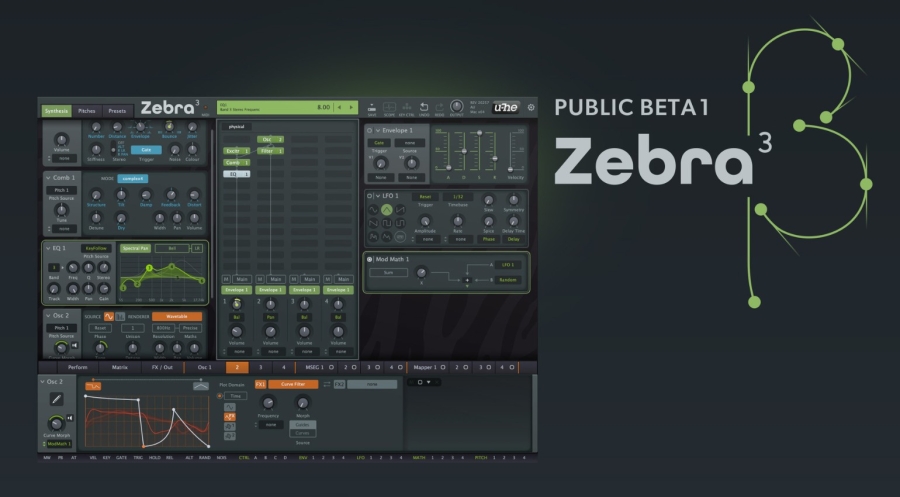
Zebra 3’s development has been gradual and careful. After years of incremental updates to Zebra2 and related products, u-he announced a public beta program for Zebra 3 earlier in the year; that public beta has allowed the company to stabilise a substantially new oscillator and modulation architecture while collecting feedback from an engaged community. In parallel, u-he released Zebralette 3 — a free, lightweight sibling that previews the new oscillator engine — as a preparatory step towards the full Zebra 3 release. The public messaging from u-he makes two things clear: the engine is new and ambitious, and some parts of the UI, factory bank, and CPU optimisation were still being refined in beta.
That approach makes sense for an instrument of this complexity. Zebra has always attracted producers who enjoy experimentation and careful patch construction, and u-he have chosen to engage that audience directly rather than rush a polished but compromised product. Public beta snapshots and forum threads reflect active troubleshooting, feature tuning, and honest discussion around CPU cost versus sonic payoff.
What’s different in Zebra 3 — the headline changes
From the hands-on previews and u-he’s own notes, a few core innovations define Zebra 3:
-
A rebuilt oscillator and additive/wavetable tooling. The new oscillator engine — already previewed in Zebralette 3 — brings spline-based waveform editing, additive synthesis, and richer wavetable manipulation. That opens a wide range of spectral possibilities, from razor-sharp harmonics to soft, evolving textures.
-
Vector and modular routing reimagined. Zebra 3 enhances the modular approach of its predecessors with more explicit routing options and vector-style control over how modules blend and morph. This gives designers intuitive control over timbral morphing across multiple oscillators and filter paths.
-
New modules and effects. u-he has added fresh module types and expanded effect options that are geared toward cinematic and evolving sounds — not just classic analog emulation. Expect resonators, improved filters, and effects that play nicely with the additive engine.
-
Workflow & UI upgrades (progressive). Zebra 3’s UI and workflow have been rethought; however, u-he has been transparent that UI finalisation was part of the beta cycle. The company released Zebralette 3 as a learning ground to get users comfortable with new curve editors and modulation visualisations before the full synth ships.
-
Performance considerations. The new algorithms and higher internal fidelity mean modules can be more CPU-intensive than their Zebra2 equivalents. U-he’s early notes and forum threads point to optimisation work ongoing during beta: the sonic improvements come at a cost, and the company is balancing CPU demand against the new capabilities.
These changes are not incremental; they position Zebra 3 as a contemporary, spectral/ additive hybrid rather than a straight sequel that merely sheds legacy constraints.
How Zebra 3 sounds — character and use cases
Zebra’s identity has always been about motion, timbral complexity, and the art of layering. Zebra 3 amplifies those strengths while expanding the palette:
-
Spectral goodness. The additive and spline tools let you sculpt harmonic content with surgical precision. That means crystalline bell tones, evolving pads with shifting overtone structure, and harmonic textures that morph without repeating obvious loops. Use cases: cinematic scoring, ambient pads, atmospherics for games and film.
-
Textural synthesis. The combination of wavetable, additiv,e and vector blending allows you to create textures that feel alive — useful for risers, morphing FX, and background beds that never sound static. Layering Zebra 3 with a simpler synth is a common production tactic: Zebra handles motion while a basic analog emulation carries the rhythmic or tonal anchor.
-
Experimental leads and percussion. With the right routing and filter choices, Zebra 3 can produce metallic, percussive tones and glassy leads with long spectral tails — very helpful when you want something that cuts but remains interesting across a mix.
-
Interactive and generative patches. The improved modulation and vector controls make it easy to design patches that respond to performance gestures (MIDI CC, aftertouch, mod wheel) and internal clocks — thereby supporting generative and evolving composition workflows. Early testers describe Zebra 3 as more of a “playground” than a preset bank.
Practical considerations — compatibility, CPU, and workflow
If you plan to adopt Zebra 3 into a project, a few pragmatic points matter:
-
System resources. Expect higher CPU usage per module than older Zebra versions; plan your sessions accordingly and consider freezing or rendering heavy Zebra tracks when arranging. u-he have been optimising during beta, but ambitious patches will still demand modern hardware.
-
Learning curve. Zebra 3 offers more control and more parameters. That comes with extra learning time for users unfamiliar with additive and spline editing. Zebralette 3 (the free preview) is an excellent way to familiarize yourself with the new oscillator and curve tools before committing to the full instrument.
-
Format & DAW support. U-he maintains robust plugin format support (VST3, AU, CLAP, and AAX, where applicable). Check u-he’s official notes for the latest compatibility details — particularly if you use Apple silicon or rely on AAX for Pro Tools workflows.
-
Factory content & community presets. The factory bank will be important: Zebra 3’s potential is unlocked in part by well-crafted demos and templates. Expect u-he to ship a sizable factory set, and the community is already producing presets and walkthroughs as the public beta progresses.
Workflow tips — how to get results fast
-
Start in Zebralette 3. Use the free engine preview to learn spline and wavetable editing without committing CPU or license cost.
-
Use vector blending for motion. Place two contrasting oscillators and use vector interpolation to create continuous spectral movement — great for pads and transitions.
-
Reserve Zebra for texture duties. Keep a dry, simpler synth underneath to preserve transient clarity while Zebra supplies atmosphere and motion.
-
Render test patches. When you discover a complex, CPU-heavy timbre, render short loops to WAV and re-import as an audio layer to preserve the sound while reducing CPU load.
Who should consider Zebra 3?
Zebra 3 is best for producers and composers who prioritise sound design and textural motion: film/game composers, ambient and electronic producers, and sound designers working on cinematic FX. If your workflow centres on immediate analogue emulations or you cannot tolerate high CPU usage, Zebra 3 might be overkill — Zebra Legacy and other lighter synths will still be better for those cases.
Final assessment
Zebra 3 is an ambitious rebuild that honours the instrument’s modular heritage while embracing modern synthesis techniques. The public beta and Zebralette 3 previews show a synth that is deep, flexible and tailored for designers who enjoy digging into spectral detail. The tradeoffs are higher CPU demand and a non-trivial learning curve — but for users who want a “toolbox” to craft unique, moving timbres, Zebra 3 looks set to be a defining release. As with any major synth update, watch the public beta notes and the official u-he announcements for final pricing, licensing and the day-one factory bank.
