


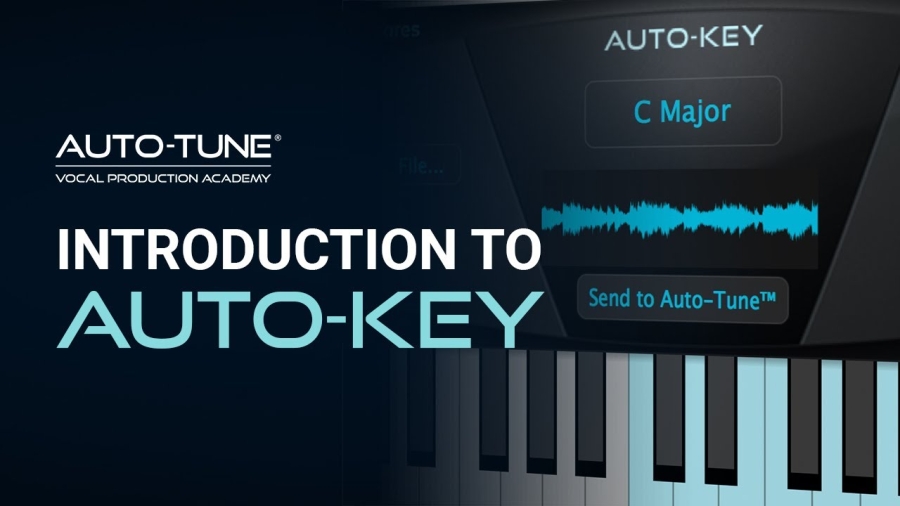
Exploring Auto-Key by Antares: The Ultimate Tool for Effortless Key Detection in Music Production
In the ever-evolving world of music production, where technology bridges the gap between creativity and technical precision, few companies have left as indelible a mark as Antares Audio Technologies. Founded in the late 1990s, Antares revolutionized the industry with the introduction of Auto-Tune in 1997, a pitch-correction software that became synonymous with modern vocal processing. From Cher's iconic "Believe" to the auto-tuned anthems of contemporary pop, hip-hop, and electronic music, Auto-Tune has shaped the sound of generations. But Antares didn't stop there. As producers demanded more streamlined workflows, the company expanded its suite of tools to include innovative plugins like Auto-Key.
Auto-Key by Antares, now in its second iteration as Auto-Key 2, is a game-changer for musicians, producers, and engineers. Released initially around 2019 and upgraded to version 2 on April 14, 2023, this plugin automates the often tedious process of key and scale detection. In an era where time is money in the studio, Auto-Key eliminates guesswork, allowing creators to focus on what matters most: the music. Whether you're a seasoned pro fine-tuning vocals or a beginner experimenting with loops and samples, Auto-Key integrates seamlessly into your digital audio workstation (DAW), enhancing productivity and accuracy.
This blog dives deep into Auto-Key's origins, features, functionality, and real-world applications. We'll explore how it fits into the broader Antares ecosystem, share user insights, and offer practical tips to maximize its potential. By the end, you'll see why Auto-Key is an essential addition to any producer's toolkit. And if you're ready to add it to yours, you can purchase Auto-Key on www.soundsspace.com for just $49.00, with instant digital delivery via email.
The History and Evolution of Auto-Key
Antares Audio Technologies has a storied history rooted in innovation. The company's flagship product, Auto-Tune, was born from the vision of Dr. Andy Hildebrand, a geophysicist who applied seismic data analysis techniques to audio processing. Released on September 19, 1997, Auto-Tune quickly became the industry standard for pitch correction, used by artists across genres to achieve flawless vocals.
As music production software advanced, producers faced new challenges. Determining the key and scale of a track—essential for effective pitch correction and harmonic alignment—often required manual analysis or third-party tools. This bottleneck inspired Antares to develop Auto-Key. The first version debuted around 2019, addressing these pain points by automating detection processes. It was a natural extension of the Auto-Tune family, designed to work hand-in-hand with plugins like Auto-Tune Pro, EFX+, and Artist.
The release of Auto-Key 2 in April 2023 marked a significant upgrade. Coinciding with updates to Auto-Tune EFX+ 10.0, this version introduced enhanced detection algorithms powered by TONART V3 from zplane.development, improved tempo recognition, and a more intuitive user interface. Antares also expanded its offerings with a mobile app, Auto-Key Mobile, launched in August 2021 for iOS (with Android and Windows versions following), allowing on-the-go key detection. These developments reflect Antares' commitment to adapting to modern workflows, where producers might switch between studio sessions and mobile ideation.
In the context of 2025's music landscape, where AI-driven tools are commonplace, Auto-Key stands out for its reliability and integration. It's not just a standalone plugin; it's part of a subscription-based ecosystem like Auto-Tune Unlimited, which bundles multiple vocal processing tools. This evolution underscores Antares' role in democratizing professional-grade production, making advanced features accessible to home studios and major labels alike.
What is Auto-Key?
At its core, Auto-Key is an automatic key, scale, and tempo detection plugin. It's designed to analyze audio in real-time or from uploaded files, identifying the fundamental musical elements that form the backbone of any track. Unlike traditional methods that rely on ear training or spectrum analyzers, Auto-Key uses sophisticated algorithms to detect the key (e.g., C Major or A Minor), scale (major, minor, harmonic minor, etc.), and even tempo in beats per minute (BPM).
The plugin is particularly tailored for use with Auto-Tune, Antares' pitch-correction software. By detecting these parameters, Auto-Key can instantly transmit them to compatible Auto-Tune instances across your project. This means no more manually inputting scales for each vocal track—Auto-Key handles it with a single click. It's ideal for scenarios like remixing, where matching keys between samples is crucial, or live sessions where quick adjustments are needed.
Auto-Key supports a variety of audio formats for file-based analysis, including MP3, WAV, FLAC, and AIFF. It also detects the tuning reference frequency, which is vital for tracks not tuned to the standard A=440 Hz (common in older recordings or alternative tunings). The onscreen keyboard visually highlights detected pitches, providing an intuitive way to verify and tweak results.
In essence, Auto-Key bridges the gap between musical theory and practical application. For DJs curating sets, it helps find harmonically compatible tracks. For producers, it streamlines vocal tuning, ensuring everything sits perfectly in the mix. Its polyphonic analysis makes it suitable for full mixes, not just individual instruments, setting it apart from monophonic-focused tools.
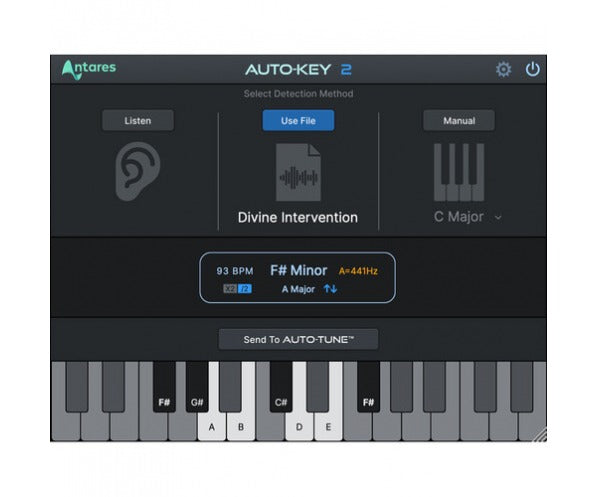
Here's a screenshot of the Auto-Key 2 interface, showcasing its clean design with the central display, keyboard, and controls for modes like Listen and File.
Key Features of Auto-Key 2
Auto-Key 2 builds on its predecessor with a host of refined features that cater to professional demands. Let's break them down:
- Automatic Detection: The plugin scans audio in real-time via your DAW's insert or from dragged-and-dropped files. It identifies key, scale, tempo, and reference pitch with high accuracy, thanks to the updated TONART V3 engine. This is especially useful for complex arrangements where manual detection would be time-consuming.
- Integration with Auto-Tune: One-click sending of detected parameters to all compatible Auto-Tune plugins in your session. This includes Auto-Tune Pro, Access, EFX+, and Artist. For projects with multiple vocal layers, this feature alone can shave hours off your workflow.
- Modes of Operation:
- Listen Mode: Analyzes live audio playback.
- File Mode: Processes uploaded audio files quickly.
- Manual Mode: Allows user overrides for custom scales or keys.
- Automation Support: Enables key changes over time, perfect for tracks with modulations.
- User Interface Enhancements: Resizable window with light and dark modes for better visibility in various studio environments. The central display shows detected key, scale, tempo, and reference frequency clearly.
- Tempo Detection: Newly emphasized in version 2, this helps sync elements in remixes or ensure rhythmic alignment.
- Reference Frequency Adjustment: Detects deviations from A=440 Hz and allows corrections, ensuring compatibility with diverse recordings.
- Compatibility: Works as a VST, AU, or AAX plugin on Mac (macOS 10.14+) and Windows (10+). Requires compatible DAWs like Pro Tools 2018.1 or later, Logic Pro, Ableton Live, etc. It's 32-bit and 64-bit supported.
These features make Auto-Key versatile for genres from pop to EDM, where precise harmonic matching is key to a polished sound.

This image highlights the plugin's keyboard view, where detected notes light up for visual confirmation.
How Auto-Key Works: A Step-by-Step Guide
Using Auto-Key is straightforward, even for novices. Insert the plugin on your master bus or a mix bus containing polyphonic audio—avoid using it on solo vocals or monophonic instruments, as it's optimized for fuller mixes.
- Setup: Load Auto-Key into your DAW. Ensure compatible Auto-Tune instances are present in your project.
- Analysis:
- In Listen Mode, play your track; Auto-Key analyzes in real-time.
- For files, drag and drop supported formats into the plugin window.
- Detection: The algorithm processes the audio, displaying results in seconds. You'll see the key (e.g., E Minor), scale type, BPM, and reference pitch.
- Transmission: Click "Send to Auto-Tune" to update all linked plugins. If your track has key changes, use automation lanes to program shifts.
- Refinements: If detection isn't spot-on (due to complex chords or noise), switch to Manual Mode to select from presets or customize.
In practice, this workflow saves immense time. For instance, when tuning vocals to a beat, Auto-Key ensures the scale matches, preventing off-key artifacts.
Buy AutoTune 2026 + FREE AutoKey 2 | Vocal Processing | Plugin ...
Another view of the interface, demonstrating the detection display and settings panel.
User Reviews and Real-World Experiences
Auto-Key has garnered mixed but generally positive feedback. On Sweetwater, it holds a 3/5 rating from four reviews as of 2025. Kyle L., a studio owner, praises the one-click Auto-Tune syncing: "Hooray! It sets all Auto-Tunes to the same key effortlessly." Evaristo L. raves, "Love this plugin... definitely recommended." However, criticisms include licensing issues (Marc M.: "Stops deauthorizing itself") and occasional inaccuracies (BFS: "Gives wrong BPM and key").
On Reddit and forums like KVR, users note its utility for quick checks but advise verifying results manually for tricky tracks. Professionals like mixing engineer Dan Parry highlight its role in modern production: "Auto-Tune has shaped records, and Auto-Key speeds that up."
Overall, it's valued for efficiency, though some wish for better accuracy in edge cases.
Tips and Tricks for Maximizing Auto-Key
- Use on master buses for best polyphonic detection.
- Combine with Auto-Tune's Humanize for natural-sounding corrections.
- For remixes, analyze loops individually via File Mode.
- Adjust reference frequency for vintage tracks.
- Test in demo mode before buying to ensure DAW compatibility.
Conclusion
Auto-Key by Antares is more than a plugin—it's a workflow accelerator that embodies the company's innovative spirit. From its historical roots in Auto-Tune to the advanced features of version 2, it empowers creators to produce with precision and speed. Whether detecting keys for vocals or matching samples, Auto-Key delivers.
Ready to try it? People can purchase Auto-Key on www.soundsspace.com for $49.00, with digital delivery and full compatibility details provided. Elevate your productions today!
